Thursday, May 17, 2018

Setup Meld for GIT on Windows

Try running the following lines on command prompt:

Assumption: GIT is currently installed on your Windows machine.

git config --global merge.tool meld

git config --global diff.tool meld

git config --global mergetool.meld.path "C:\Program Files (x86)\Meld\Meld.exe"

Sunday, October 29, 2017

Bills Payment Collection: Teller's Perspective

Typical Scenario in the World of Bills Payment

Mr. Postman approaches a residential gate and leaves a Meralco bill inside the mailbox. After a while, Ms. Millennial checks her mailbox and sees the Meralco bill. She opens it and reads the mail contents. Nothing new - she expects this every month. Ms. Millennial heads to the bank and lines up to pay her month's electricity bill over-the-counter. Mr. Teller receives the Meralco bill a.k.a. Statement of Account (SOA) from Ms. Millennial. Then, he verifies details before processing collection of the payment. On top of the Meralco bill, Mr. Teller asks Ms. Millennial for a service / processing fee in cash.

Upon successful processing, Mr. Teller prints a payment validation for Ms. Millennial's Statement of Account. The bank informs Meralco regarding the payment made by Ms. Millennial.

Ms. Millennial expects an uninterrupted electrical service for the coming month since she successfully paid her electric bill at the bank.

Main Players

Here are the three main players you will notice in any bills payment saga.
Player
Description
1. Merchant
  • Also known as Biller, Institution, Bill-issuing company.
  • The service provider / product supplier.
  • A good example for this is Meralco.
2. Subscriber
  • Also known as Customer, Client.
  • The receiver of services / products provided by Merchant.
3. Payment processor
  • Also known as Payment Center, Financial institution, Bills payment agent.
  • Serves as 'Bayad Center'.
  • An example would be a BDO teller which processes Payment Slips.
  • Payment processor between Subscriber and Merchant.
A teller (a.k.a. cashier or customer representative), being the front liner for bills payment, also bears the burden of validating and processing payments from subscribers paying over-the-counter. Apparently, automation is key to alleviate the problem.


Questions on a Teller's Mind
From the story above, try to imagine what is in Mr. Teller’s mind while processing the payment being made by Ms. Millennial. It might be dozens among the following:
  • Is our branch open and ready to process any payment transaction right now?
  • Do I have access to our bills payment system?
  • Is our branch allowed to accept payment on behalf of the Merchant specified on the customer's Statement of Account (SOA)?
  • Where can I locate the subscriber's number and name from SOA?
  • Can I use a barcode scanner to enter subscriber details?
    • Where is the barcode located on the SOA?
    • Can I manually input in case of barcode scanner unavailability?
      • Do I remove certain characters (space, hyphen, etc.) during manual input of barcode numbers?
  • Will processing of this payment require branch officer override?
  • Can I cancel or modify a successfully posted transaction?
  • Is the subscriber allowed to pay beyond due date?
  • Should I require the payor to present the statement of account while paying?
  • Should the payor present valid identification card/s for this payment to proceed?
  • Should I collect a service fee? How much?
  • Should I collect service fee
    • From the payor?
    • From the Merchant? Will it be collected daily or monthly?
  • In which collection account will the payment go?
  • What are the acceptable mode of payments? Is cash allowed? How about check?
  • If is check payment:
    • Will I allow a late check?
    • Is the check payee name listed on the valid payee names for this merchant?
    • Will I allow multiple checks as payment for this payment transaction?
    • Will I allow combination of cash and check in this transaction?
  • Is this payment transaction reportable to Anti-Money Laundering Association (AMLA)?
  • Are there any payment amount limitations? If any, is the payment amount valid for the minimum and maximum amount allowed?
  • Will I allow it should the customer opts
    • for a partial payment?
    • for advance payment?
  • What currency is allowed for this payment? For the service fee (if any)?
  • Where can I get instructions for this merchant? This merchant’s product/s?
  • Which specific product of the Merchant is being paid for (if any)?
  • Is subscriber number subject to format / check-digit validation?
  • In which media / form should the payment validation be printed on?
    • SOA
    • Payment slip
  • Should the merchant be informed right away about the payment received? Or it can be at the end of the day?
  • How can I get help should problems arise during bill payment?
  • Can I reprint the payment validation?
  • Is the printed validation correct in terms of the following:
    • Transaction date and time
    • My teller ID
    • Sequence number
    • Organization name
    • Branch code
    • Currency
    • Transaction amount
    • Subscriber number
    • Merchant name
    • Transaction code
    • Merchant code
    • Product code (if any)
  • Should I take note of the conversion rate for this payment?
  • How much money is in my cash drawer (before I take a lunch break / end my shift)? Does it correspond to the total of payments I have received (since Start of Day / start of shift)?
  • What are the payments I made for a given time period?

There are a lot of questions. And Mr. Teller may ask these for each bill being paid for by Ms. Millennial and other subscribers.

What All the Fuss Was About
We just discussed above about bills payment from a teller’s point-of-view. As IT specialists, imagining from user’s perspective is the key to building a system that is relevant to the user, in this case a bills payment system for use over-the-counter.

I would like to say thanks to Carl, Claire, Kim, Ben, Dhoris. You know what I mean. :)

Thursday, November 5, 2015

How to open big text files on Ubuntu

Problem:
You want to read a big text file. But the editor is very slow loading it.

Solution:
Chop the big text file into smaller ones.

split -b 1024k <path/of/your/filename.txt>

The Terminal command above splits the file path/of/your/filename.text into 1024kb files.

Thursday, August 13, 2015

Resolve missing .classpath and .project on Grails project

Problem
You have an existing Grails project. It cannot be imported by eclipse / STS IDE because the files .classpath and .project are both missing.

Solution
Open the terminal on the grails project folder.
Then, run the following command on your terminal:
grails integrate-with --eclipse

Friday, April 24, 2015

How to Execute a bin File on Linux

Problem
How do I execute a .bin file on Linux?

Solution
1. Open your terminal

2. Run the following command to make the file executable:
chmod u+x <file name>

3. Execute the bin file using the following command:
./<file name>

If the installer needs administrator rights, try this command instead:
sudo ./<file name>

Friday, April 17, 2015

How to Run Integration Tests on Grails

Problem
How do I run integration tests on Grails?

Solution
Run the following command on the console:
grails test-app integration:integration

Friday, April 10, 2015

How to Drop All User Tables in Oracle

Problem
You want to remove/drop all user tables from on Oracle Database.

Solution
1. Run the following SQL query
select 'drop table '||table_name||' cascade constraints;' from user_tables;

2. Run the SQL query generated after the 1st step above.

Sunday, February 1, 2015

How to Show Hibernate SQL Statements in Grails

Problem
You want to see all Hibernate SQL statements when using grails.

Solution
You must have these line of codes inside your conf/Config.groovy configuration file.

log4j = { debug 'org.hibernate.SQL' trace 'org.hibernate.type' }
The SQL statements will appear on the standard output console.

Monday, January 19, 2015

Update MySQL User Password

SET PASSWORD FOR 'root'@'localhost' = '';

The SQL script above sets the password for the user root to blank.
The script will run successfully if the current user has UPDATE privilege on the MySQL database.

Friday, October 31, 2014

How to Import Existing GIT Project to BitBucket

Here are the steps to import your existing GIT project to BitBucket. This tutorial focuses on local GIT project. If you plan to import project from your hosting site, checkout this Atlassian article instead.

1. Login to to your BitBucket account.

2. Create a new repo.
Click Create button.
Click Create repository button to save the new repo.

3. Open your Terminal application to the project's path.
cd /path/to/my/repo

3.1. Remove any existing remote (in this case the remote name is origin). Skip this if your project has no remote yet.
git remote rm origin

4. Point your project to the new BitBucket repo.
git remote add origin https://mybitbucketusername@bitbucket.org/mybitbucketusername/myexistingproject.git

5. Push the project and all its refs.
git push -u origin --all

6. Push tags in the project.
git push -u origin --tags

Done. :)

Tuesday, September 3, 2013

Maximize an ImageView on Android

Problem
How to maximize an ImageView on Android while keeping the aspect ratio? There's a lot of combinations available on the Internet but the following code alone was able to solve my problem.

Solution
<ImageView android:layout_width="0dp" android:layout_height="fill_parent" android:layout_weight="1" android:scaleType="fitCenter" />

Important Note
Make sure the ImageView is inside a LinearLayout for the android:layout_weight to work.

Source
Comment of Mohsen Afshin on stackoverflow.com

Wednesday, August 7, 2013

phpMyAdmin Installation on Ubuntu using Terminal

Had to install phpmyadmin on Ubuntu 12.04

Just used the following command:
sudo apt-get install libapache2-mod-auth-mysql phpmyadmin


When asked to choose a Web server, I chose
[*] apache2


Clicked Enter when asked to create the database called dbconfig-common

Entered password for MySQL root, phpMyAdmin.

The installation completed but I was not able to open the link:
http://127.0.0.1/phpmyadmin/

Had to edit /etc/apache2/apache2.conf and added the following to the end of the file:
Include /etc/phpmyadmin/apache.conf


Restarted apache using
sudo /etc/init.d/apache2 restart


Finally, opened http://127.0.0.1/phpmyadmin/ again and it worked at last.

Friday, May 24, 2013

How to Display a JavaScript-like Alert in Java

Just put the following in your Java code:

javax.swing.JOptionPane.showMessageDialog(null, "Your message here");

Note:
Similar to JavaScript, your code will pause executing until you close the message dialog. So be careful when deploying your code for the client.

Thursday, May 2, 2013

OCJP Exam Tips I didn't find online


Just want to share my experience when I took the SCJP Exam years ago. Yep, OCJP was called that way back when Sun Microsystems was not yet acquired by Oracle.

After months of reviewing, thanks to God He allowed me to pass the exam with a score of 91%.

The duration of the exam is not a problem.
From my experience, the time allotted to take the exam is more than what is needed. You can actually double the number of questions on the exam so it will fit more to the exam duration. Here's why: During the exam, I actually used the time answering the questions and checking all the items all over again as if it was my first time. That is to include the time it took me to go to the restroom and also taking a glass of water outside the exam room. After I ended my exam, I still have fifteen minutes left unused.

Don't underestimate the ability of fresh eyes.
Do other things before rechecking your answers. I discovered many wrong answers when I rechecked my answers. That was, when I went to the restroom and had a drink of a glass of water. I'm sure I won't realize what's wrong with my answers if I continuously stared at my answers to each questions at that time.

Put your review book beside your bed
No superstition involved here. In this way you will cover more topics since you'll be reading it more often most likely before sleeping. Reviewing is also effective in making you sleepy. Your sleep will help you review and reviewing will help you sleep. And to you, both are beneficial :)

Reading an SCJP reviewer once is not enough
The reason is quite obvious here. Even with a year of experience in Java programming, it is not a reason that you already know all the topics covered in the exam. Take mock exams that measure your ability for each topic. After reading the book and taking exams, review topics you think you are not really familiar with yet. Then, code as necessary.


More tips when taking the exam:


Eat your meal two hours before the exam
When you eat your meal, your blood supply focuses on your stomach for about two hours during digestion. Your brain needs a lot of oxygen especially when taking the exam. Prevent your stomach from competing with the oxygen your brain needs.

Make an effective habit on your exam time
For sure you know the time of the day you will take the exam right? Why not answer mock exams on the days prior to your exam at the same time of the day of your exam. This will condition your body. The time you take the exam, your body already knows that you will be answering questions again.

Don't schedule your exam on an unholy hour
Perhaps you don't want to take your exam very early. Also, will not schedule it on a time of the day you usually feel sleepy.

Ask permission to God
Things happen if only God allowed it. Why not ask His permission. His decision determines if you'll pass or fail. But wait, just make sure you did your part - reviewed enough for the exam. Ask His protection on the day of your exam. Who knows you'll be sick by day you take it, or you'll be late because of the traffic, etc. It is good to rely to someone who controls everything. Make sure you ask it in Jesus' name. It's the only way you can connect with God.

Initially posted this entry on my multiply.com but multiply has closed my account already.

Sunday, April 28, 2013

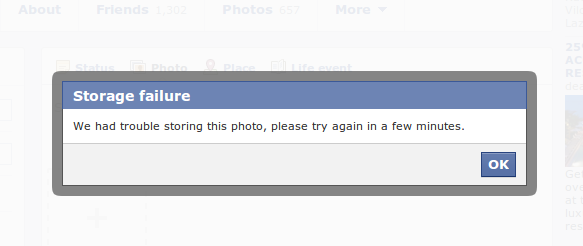
Storage Failure - Facebook


Is Facebook running out of disk space?

I can't believe this. Just had trouble uploading images to Facebook this day. Creating an album and uploading the images give me the following error:


Facebook album storage failure error message


Trying to post a Facebook status with photo gives me a similar storage failure message:

Facebook status with image storage failure error message


Whew!
If you've also experienced the error. This is to say you are not alone. :)

Anyway, it is Facebook so let's expect it will be fixed soon by their talented developers.

Tuesday, March 26, 2013

jQuery Selector Using Data Attribute


<div id="divId" data-more-info="data value">
    Some div content
</div>


The div element above has two attributes declared. The first one is the id attribute and the second one is the data-more-info attribute.

1. The selector by id for the div above is pretty easy:
$("#divId")

2. Now, here's a way to select the div above using the second attribute data-more-info:
$("div[data-more-info='data value']")


The second query returns all div elements with 'data value' as value for its data-more-info attribute.

Wednesday, March 13, 2013

Oracle Webcenter Portal 11g Hands On Workshop


For reference, here's an outline for a training I will be attending to in the coming days.

Day 1


  • Introduction to WebCenter
  • ADF and JDeveloper as foundation for WebCenter Portal
  • Introduction to Data-binding Data Visualization Tool (DVT) in ADF
  • Lab exercise and discussion of Partner project requirements and goals
  • Java Server Faces and ADF architecture and its components
  • Building a web-based UI using JDeveloper and ADF
  • Lab exercise


Day 2


  • Building Page template and page layout,
  • Navigation and menu UI in WC Portal
  • Content Presenter (in WebCenter Portal) to Oracle WC Content
  • Lab exercise
  • ADF Bindings and Task-flow
  • Managing page and template during development and run-time
  • Lab exercise


Day 3


  • Portlet and web-clipping
  • WebCenter Portal Security
  • Integration with back-end services/systems
  • Managing run-time/design-time changes during SDLC
  • WebCenter Development Lifecycle

Installing rpm file in Ubuntu

Simple run the following command on your terminal:

sudo alien yourFileName.rpm

Then, double-click the generatd .deb file.


If alien is not yet installed, you will need to run the following command first:

sudo apt-get install alien dpkg-dev debhelper build-essential

Where is JDeveloper Installed in Ubuntu

Just installed Oracle JDeveloper but don't know where to locate the file to launch it?


Find it at the following path:
/home/<yourUsernameHere>/Oracle/Middleware/jdeveloper/jdev/bin/

Then, run the jedv or jdev.sh script to start launching the JDeveloper application.

Thursday, July 12, 2012

Search Google using a Picture

Just found out that you can search pictures similar to a picture in Google. This is just amazing for me. Here's the search result I got after uploading a picture from my computer: Click here.